这篇教程python 使用uiautomator2连接手机设备的实现写得很实用,希望能帮到您。
1. 安装ADB地址:https://developer.android.google.cn/studio/releases/platform-tools?hl=en
下载对应环境的工具 解压
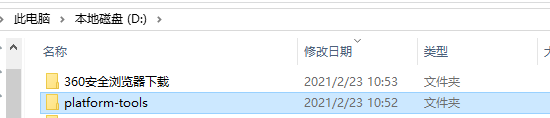
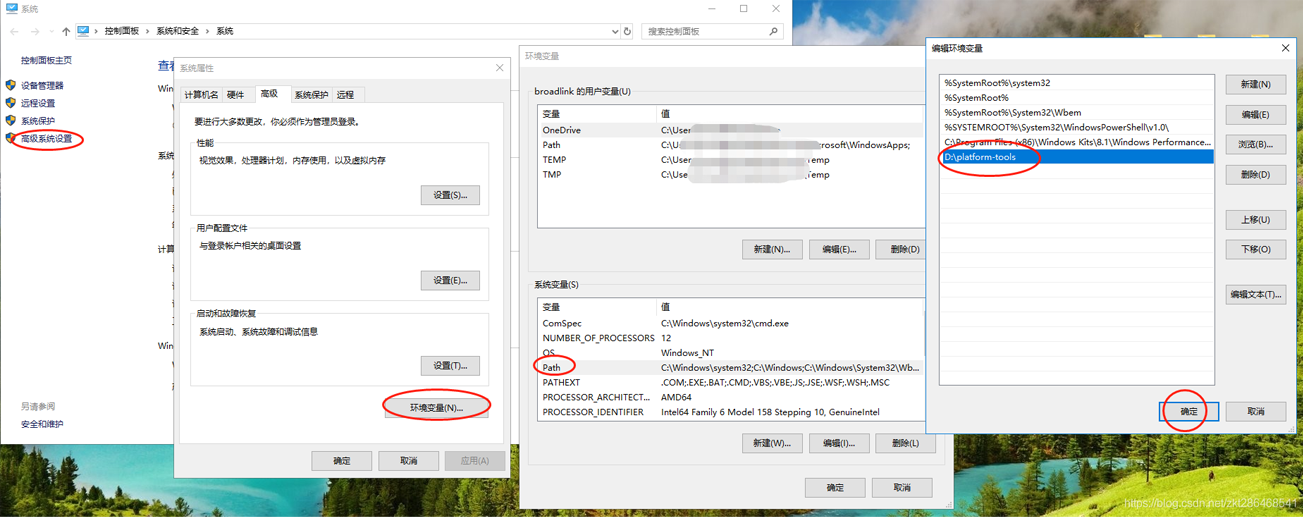
之后设置环境变量
右键我的电脑->属性 然后按下图顺序 最后添加platform-tools的路径保存即可
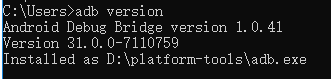
设置好后cmd打开命令行
输入adb version
可以查看adb版本信息 ok~
2. 安装uiautomator2python下载uiautomator2包 pip install --pre uiautomator2 使用数据线将手机与电脑相连 使用开发者模式
在电脑命令行输入 python -m uiautomator2 init 进行初始化
手机同一安装atx 和com.github.uiautomator.test 如果需要wifi连接 adb需要tcpip连接模式
所以在数据线连接时我们需要设定端口 3.测试连接手机与电脑连接同一个局域网
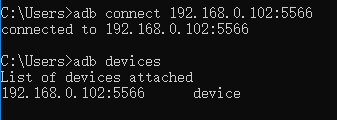
手机连接wifi后 ip为 192.168.0.102
adb连接手机设备
python测试如下 import uiautomator2 as u2#d = u2.connect() # 有线连接,手机需要插电脑上 d = u2.connect("192.168.0.102:5566") #通过无线连接,电脑和手机需要在同一个局域网内,并且需要先用有线的方式做过初始化print(d.info)输出设备信息 {‘currentPackageName': ‘com.bbk.launcher2', ‘displayHeight': 2160, ‘displayRotation': 0, ‘displaySizeDpX': 360, ‘displaySizeDpY': 720, ‘displayWidth': 1080, ‘productName': ‘PD1709', ‘screenOn': True, ‘sdkInt': 27, ‘naturalOrientation': True}
连接成功 到此这篇关于python 使用uiautomator2连接手机设备的实现的文章就介绍到这了,更多相关python uiautomator2连接手机设备内容请搜索51zixue.net以前的文章或继续浏览下面的相关文章希望大家以后多多支持51zixue.net!
python排序的方法实例总结
Python+uiautomator2实现手机锁屏解锁功能 |